Create & drop Table, insert & delete & select & update & truncate
by 핫도구가장 먼저 Database를 생성하고 생성되었는지 확인 후 table을 생성한다.
create table student (
studentno int(3) auto_increment Primary key,
name varchar(10) not null,
age int(3) check( age>15 and age<100 ),
teamno int(1),
info varchar(30),
point float(5,2) default 100
);
이렇게 column level로 정의할 수도 있지만 table level로 정의할 수 있다.
create table student (
studentno int(3) auto_increment,
name varchar(10) not null,
age int(3),
teamno int(1),
info varchar(30),
point float(5,2) default 100,
primary key(studentno),
check(age > 15 and age < 100)
);
이 차이점으로 column수준에서 not null, unique, check, default, primary key는 가능하지만 foreign key 및 복합 unique 혹은 복합 primary key는 불가능하고 table수준에서 모든 종류의 제약조건을 정의할 수는 있지만 primary key, unique, foreign key는 사용할 수 없다.
즉, auto_increment, defualt와 같은 제약조건과 not null은 table level에서 정의할 수 없지만 primary key, unique, foreign key를 정의 할 수 있는 장점이 있다.
table을 보기 위해서 select * from student;를 입력하면 된다.

table을 만든 이후 데이터를 집어 넣어준다.
insert into table이름(넣어줄 column 이름 -- 만약 전체라면 안 넣어도 됨) values(데이터를 순서대로 넣어주면 된다.)
insert into student(name,age,teamno,info,point) values('고용기',40,1,'최고령 입니다',100.00);
insert into student(name,age,teamno,info,point) values ("김경래",17,4,"초미남천재재벌",99.99);
insert into student(name,age,teamno,info,point) values('민기훈',25,2,'민기훈입니다',07.30);
insert into student(name,age,teamno,info,point) values ('방기로',28,4,'초미남',100.99);
insert into student(name,age,teamno,info,point) values('방효윤',30,2,'안녕',99.99);
insert into student(name,age,teamno,info,point) values ("신의종",17,4,"초미남천재",99.99);
insert into student(name,age,teamno,info,point) values('신재연',24,1,'곤니찌와 신재연입니다',100.00);
insert into student(name,age,teamno,info,point) values ("심성용",31,3,"조장 입니다.",10);
insert into student(name,age,teamno,info,point) values('우연정',32,1,'우린팀이니까의 우연정입니다',100.00);
insert into student(name,age,teamno,info,point) values ("유승범",28,3,"조원 입니다.",8);
insert into student(name,age,teamno,info,point) values("이승현",30,2,"내용테스트" ,100);
insert into student(name,age,teamno,info,point) values("이원우",23,1,"playfram 조장입니다.",100.50);
insert into student(name,age,teamno,info,point) values ("전용덕",28,3,"조원 입니다.",8);
insert into student(name,age,teamno,info,point) values ("정혜미",31,2,"욕쟁이 할마니",50.55);
insert into student(name,age,teamno,info,point) values ("황지호",30,3,"조원 입니다.",9);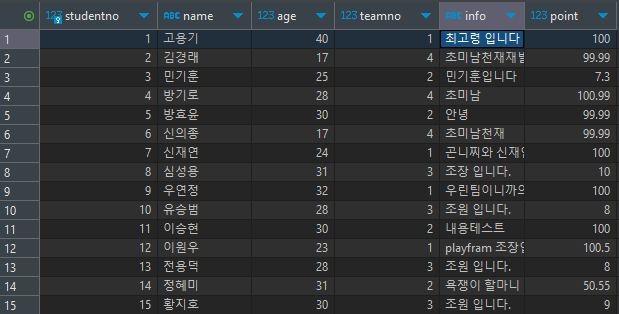
이처럼 데이터가 들어가게 된다.
여기서 수정을 하기 위해서
update table이름 set 바꿀 row와 값(age = 50) where(조건절) 바꾸고자하는 값(age = 40)이지만 일반적으로 식별자를 씀(studentno = 1)
update student set age = 20 where studentno = 1;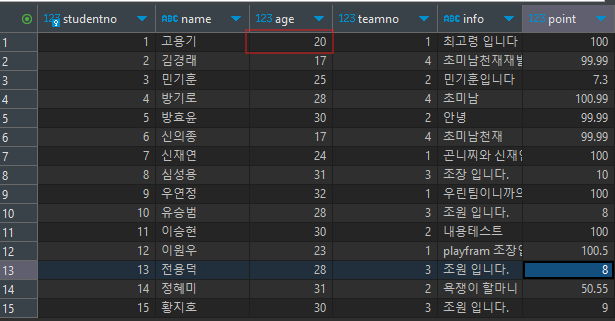
혹은 primary key 설정한 것이 없으면 insert 만약 있다면 update 하는 on duplicate key update도 존재한다.
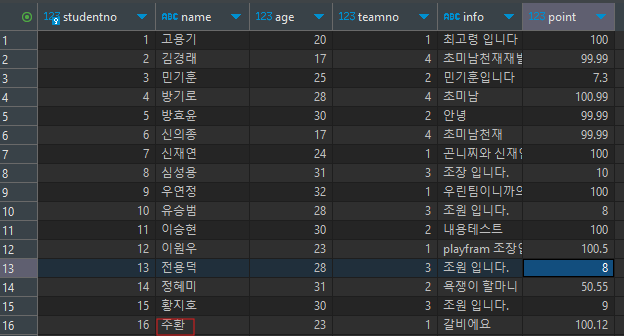
insert into student (studentno, name, age, teamno, info, point ) values (16, '갈비', 23, 1, '갈비에요', 100.12) on duplicate key update name = '주환';
같은 코드를 한번 더 실행하면 primary key로 설정한 studentno가 update된다.
만약 한 줄의 데이터를 지우고 싶으면
delete from table이름 where 조건
delete from student where studentno=16;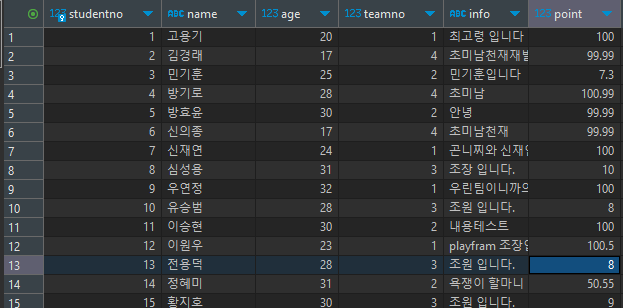
만약 table의 데이터 전체를 지우고 싶다면 truncate를 사용하면 된다.
truncate table이름
truncate student;
블로그의 정보
AquaMan
핫도구